How can I track the percentage of loaded external models, the way you are doing it in your sample scene?
Hi,
- When you assign the model to
<needle-engine src> you can use theloadprogressattribute (examples) - When you use a SceneSwitcher you can load it’s loading progress callbacks
- When you use AssetReference you can pass in a callback to loadAssetAsync
- When you call
loadAssetdirectly (AssetReference uses this method under the hood) you can also provide a callback
In most cases SceneSwitcher or AssetReference.loadAssetAsync is all you need.
I am loading the GLB model the same as in the examples External Model Loading.
Also is there possible to automatically start animation in loaded GLB files?
Great.
Yes, to autoplay you can use the AnimationUtils class from Needle Engine with your loaded object:
import { AnimationUtils } from "@needle-tools/engine";

const object = await ref.loadAssetAsync();
if(object) AnimationUtils.autoplayAnimations(object)
Thanks
Can you explain what the ref property is, just to be sure? Thanks.
Even better, can you give me a full example of the best way to load glb model.
It’s just your AssetReference variable
const ref = AssetReference.getOrCreateFromUrl(<url>);
// ...
I have noticed that sometimes my loaded model does not appear on the first try, but it loads the next time I try. It happens just on the first load of the model.
const asset = AssetReference.getOrCreateFromUrl(url, this.context);
const instance = await asset.instantiate(this.parent);
this.currentObject?.destroy();
if(instance) AnimationUtils.autoplayAnimations(instance)

if (this._orbitControls != undefined)
{
    if(this.startSettings?.Autofocus.On)
    {
         this._orbitControls.autoFit = true;
         this._orbitControls.fitCamera();
     }
}
This is the code I am using for download.
And this is the demo URL.
How can we reproduce this or what should I expect to see on the provided website?
I tried multiple times and cleared my cache and I get a chair model every time after a few seconds (currently traveling so my connection isn’t as good as normal and it still loads fine)
Sometimes, when I create a new folder on the server and put the app in it, then on first load scene loads, but not the model. When I refresh the website, it works, and then even after clearing the cache, it works.
I have sent the website to the client, and this happened to him when it first opened. It happened to me also couple of times.
This sounds like an issue in your server configuration. Which hoster are you using? Are you using a CDN (cloudflare, fastly, …)? Are you hosting on AWS?
It could also be that the first request takes longer because the asset is not CDN cached yet and an origin request is made in which case (depending on where you/your client are and where your server is it takes longer to complete the request). Subsequent requests are then faster because the asset is served from a CDN closer to your location. Just guessing here tho.
Here are the response headers of your root GLB file

Where in your application is the code you shared above running from? Is this inside a needle component or elsewhere?
Are you using this code to change the src of the needle-engine attribute or to trigger loading a different model?
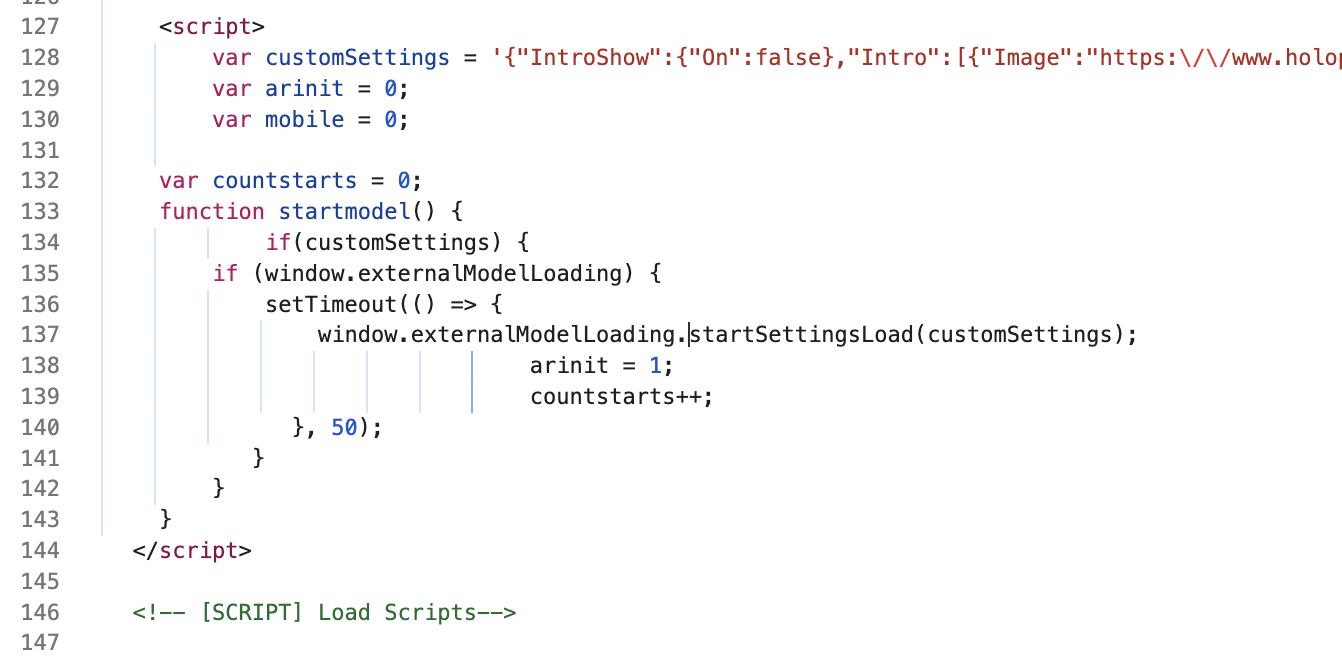
If that’s the case is there a reason why you dont simply change the src url on your loaded model in <needle-engine> ?
Also: if this code runs before you scene has been setup and components become active which it looks like it easily could do then it would explain the missing model. In that case you should run your code from a needle engine lifecycle hook to make sure the scene is read (e.g. onStart((context) =>{ ... }) which runs at the beginning of the first frame after you call onStart. You can then remove the 50ms setTimeout call completely and be sure the 3d context is ready).
You can search for hooks in https://docs.needle.tools/ → Creating and using Components | Needle Engine Documentation
Will take a look at that, thanks