i see, if i set “enable GPU instancing” the material breaks
by user 263967078346653697
i see, if i set “enable GPU instancing” the material breaks
by user 263967078346653697
@Marcel_Wiessler1  sorry one more thing, is it possible to draw transparent shadergraph on top of worldspace UI?
by user 263967078346653697
Yes (if you dont set the canvas to “renderOnTop”)
this must be off if you have that component (if not you dont need to do anything)
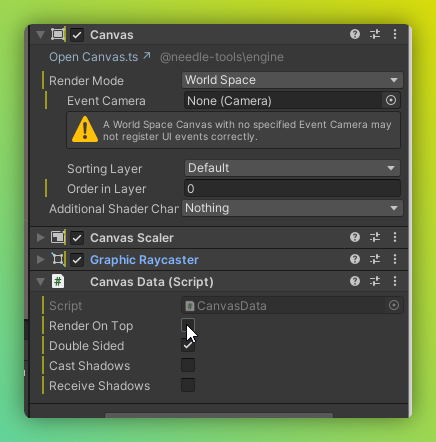
i dont have this component on my UI
by user 263967078346653697
but still it is being rendered on top
by user 263967078346653697
sheeeesh rate this transition
by user 263967078346653697
uh
pretty sweet
I love your camera transitions and splines (?) too
it feels very good
and in general you built a fun world
WE built it lool
by user 263967078346653697
ty so much, it’s just the beginning (unless we can’t get any funding)
by user 263967078346653697
also used your tip for pointer activation
by user 263967078346653697
so much better
by user 263967078346653697
Added a new sample for this and also code here: Script Examples | Needle Engine Documentation
import { Behaviour, serializable } from "@needle-tools/engine";
import { Material } from "three";

declare type MyCustomShaderMaterial = Material & {
    _Speed: number;
};

export class IncreaseShaderSpeedOverTime extends Behaviour {

    //@type UnityEngine.Material
    @serializable(Material)
    myMaterial?: MyCustomShaderMaterial;

    update() {
        if (this.myMaterial) {
            this.myMaterial._Speed *= 1 + this.context.time.deltaTime;
            if(this.myMaterial._Speed > 1) this.myMaterial._Speed = .0005;
        }
    }
}
The little wall plane in the back is using that script: https://engine.needle.tools/samples/custom-shaders/
Gr8
by user 263967078346653697