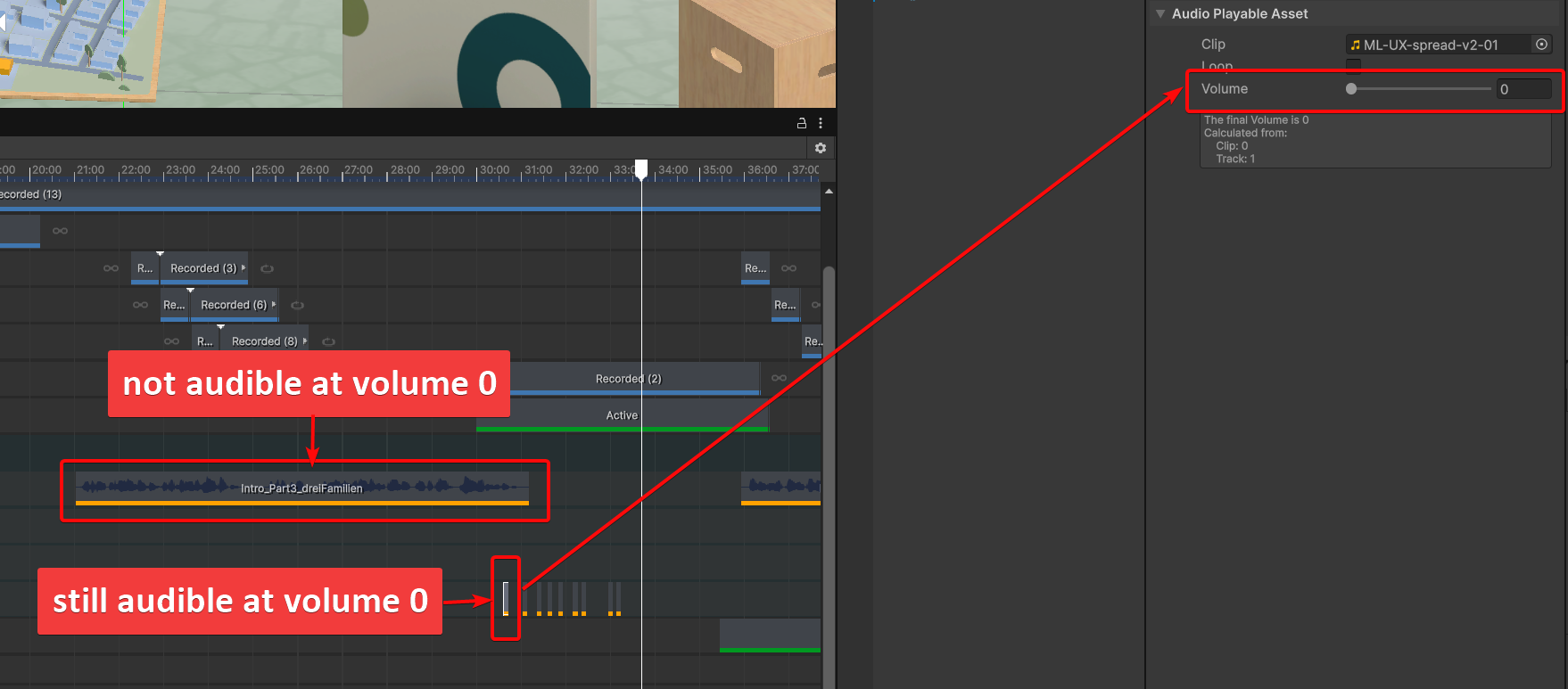
I placed some audio-clips in a Unity timeline and wanted to lower their volume. After export to the local server I noticed nothing had changed. Same result with full export.
What I figured out: Setting the volume to 0 works fine for long audio clips (they are silent), but short audio clips are still playing even with volume set to 0. Am I missing something?
Also, I wanted to check the exported timeline audio values in the Needle Inspector, but couldn’t find a timeline inspection feature. Is there a way to view timelines in the inspector?
Likely just a wiring thing: short clips aren’t picking up the per-clip volume you set, while long ones are scheduled with it. First check — put volume 0 on the AudioSource of the object the AudioTrack targets, and re-export into a clean local build so you’re not looking at a cached one. Roughly how short are the offending clips — under a second?
No timeline inspector yet, sorry: the Needle Inspector does edits, GLB and texture export, not track viewing [7]. Since volume 0 should be silent regardless of length, worth a bugreport (menu “Needle Engine/Report a Bug”) with the timeline, or point me at your deployed URL.
1 replies left - Become PRO for more replies.
Reply to this post directly if you need further help (bottom right button)
Thanks for reporting, will look into this with short audio clips.
Reagrding Needle Inspector: Timeline features are currently in development for animation but can not yet display Needle Engine timelines. This is planned for a future version tho (same for AnimationState machines)
Thanks! The audio file I used first was 30ms long. I made it slightly longer (130ms) and tried again, but the problem remained. So the threshhold seems to be above that.
Hi Susann, it seems to be related to the fade out duration which does not handle this kind of short track. May I ask why you have tracks in the timeline with volume 0? Just for reference or as alternatives? Maybe as a quick workaround you can put those on their own track and mute the whole track instead until a fix is available?
Edit: A fix will be available in the next 5.1 release and 6 alpha.
@Marcel_Wiessler1 Volume 0 was just a way to show you, that volume regulations does not work. Our actual goal was to set the clip volume a bit lower - for example to 0.5, but this value results as 1 after export.