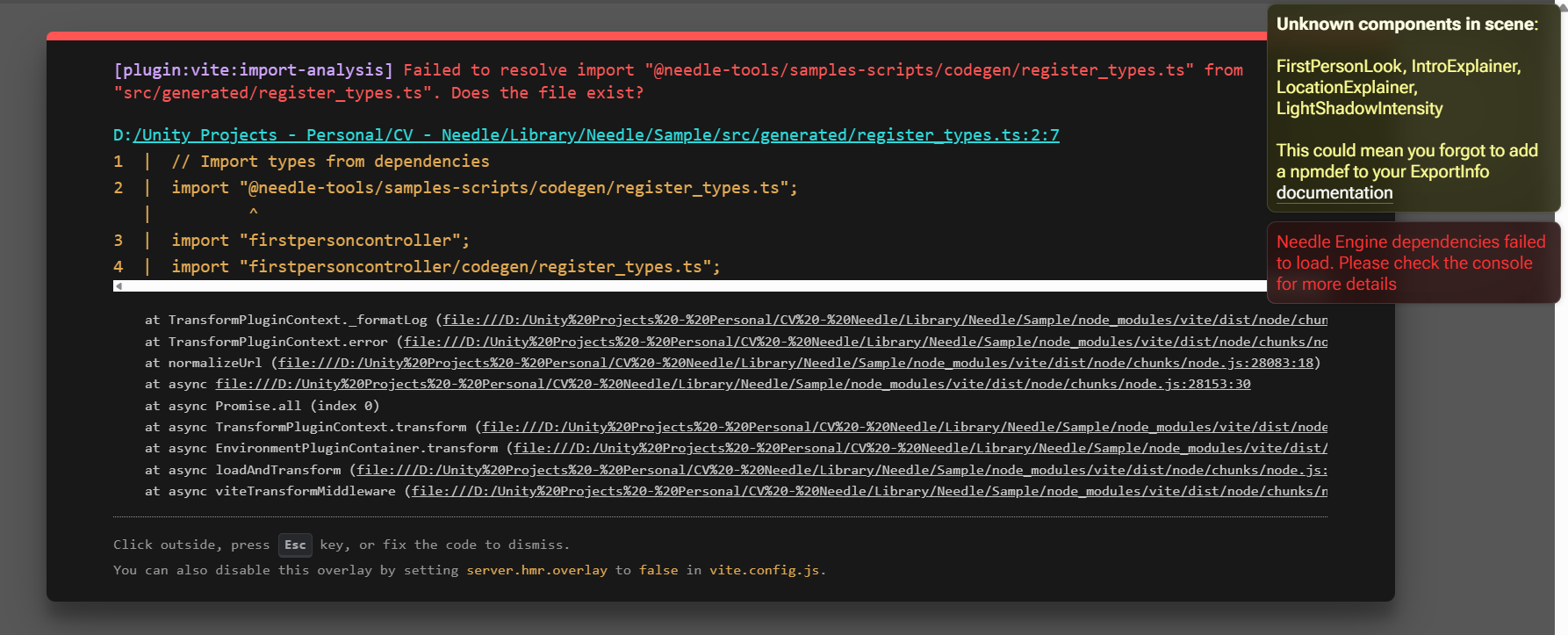
I made a few changes to my scene (changed the videoplayer from trying to play a Youtube URL to playing a local mp4 file) and all of a sudden I get errors that my own scripts are unknown components in the scene and that I might be missing an npmdef.
How did this happen? I did not change anything in the npmdefs.
The “unknown component / missing npmdef” message means a component in your scene can’t be resolved at runtime — usually its TypeScript wasn’t registered/transpiled when the scene was exported, not that you broke the npmdef.
The most likely cause for what you describe: stale codegen after re-exporting the scene. The script‑registration pass runs for scenes that carry a Needle Engine component — but for sub-scenes exported as references, that codegen does not re-run, so newly serialized components aren’t found:
“When creating new scripts in npmdefs in sub-scenes… you currently have to re-export the root scene again. This is because the code-gen that is responsible for registering new scripts currently only runs for scenes with a Needle Engine component.” Questions and Answers (FAQ) 💡 | docs
So even touching only the scene (changing the video source) can trigger a re-export that desynchronizes the generated component mappings.
Next steps:
Make sure the scene with the Needle Engine component is exported last, and re-export the root scene (not just the sub-scene).
Fully restart the dev server after re-export so codegen picks up the changes (Codegen/Needle log should show generated components).
Confirm your npmdef is still in the Needle Engine component’s dependencies list on that root scene and installed.
If those don’t fix it, share which scene you changed the video player in (root vs. a sub-scene/reference) — you can connect your project in Needle Cloud AI so the actual logs can be inspected.
Good to hear it’s working — and that’s actually a known quirk, not magic. Script registration/codegen only runs when exporting a scene with a Needle Engine component; sub-scenes exported as references don’t re-run that codegen, so a re-export can leave the generated component registry out of sync with what’s serialized in the scene. A second/third export picks up the new state.
The related FAQ note:
“When creating new scripts in npmdefs in sub-scenes… you currently have to re-export the root scene again.” Questions and Answers (FAQ) 💡 | docs
Tip for next time: if you hit it again, delete the generated scripts/ folder (and the Needle npmdef artifacts) before re-exporting, so the mapping is rebuilt from scratch instead of merged with stale entries. That makes the fix deterministic instead of “export until it works.”