I have a script on a GameObject, but it looks like it is not executed at all.
To check this I added two lines in the Start() method, one that writes a debug message to the console and one that writes to an in-world TMPro text window. I commented out everything else.
Neither of them are visible. The TMPro window still shows the text from the editor and according to the documentation, the Debug.Log statement should show up in the Developer’s tool console log but it’s not there.
When I run the script in a non-needle project it works fine.
The two most common reasons scripts don’t run in Needle Engine:
You’re writing C# in the Unity script, not TypeScript/JavaScript. Needle Engine doesn’t execute C# — it needs matching TypeScript. If you wrote Start() in a .cs file, that’s your C# code, which won’t export. You need to write a .ts component instead. Check the inspector: if it says “Generate C# Components” or shows no matching JS, that’s the issue.
No “Generate Project” button clicked. After adding scripts, you must click the Generate Project button (or “Generate C# Components”) in the Needle toolbar. Without this, the export never picks up your TypeScript files.
Fix: Write your component in TypeScript, click Generate, then export. If that still doesn’t work, share your deployed URL or send a bug report via Unity’s “Needle Engine/Report a Bug” menu.
Yes, you can reply to me directly – I’ll pick up the thread and keep helping.
And you’re right: the previous answer’s diagnosis (C# vs TypeScript, missing Generate Project) is the most common cause.
One more thing to check: make sure your component file actually exports a class with the right lifecycle name. In TypeScript, start() runs on scene start; in JavaScript it’s the same. If you used Awake() or OnStart() by mistake, it won’t run.
If the issue persists, share a minimal example at engine.needle.tools/new and I’ll take a look.
Yeah, I did write a C# script. I saw that I can write Typescript code that appears as C#, but it was not clear that I have to write Typescript and can not use C# at all
I let ChatGpt translate my script, but when I created a new Typescript file in Assets/Scripts it disappeared as soon as I changed the name and Visual Studio opened. And now I can only see the script in /Needle/Components.codegen, but there it says clearly ‘Do not edit’
And yeah you have to write logic in Typescript.
We can not automagically translate Unity C# to Three.js unfortunately (we could attempt it but it would never be complete C# + Libraries, so it would just disappoint).
But the other way around works: Typescript converted to Unity Editor UI or Blender UI so you can see your scripts and edit everything in your web project from a powerful editor (Unity/Blender/…) + animation/material/scene features that those tools give you (and take years to build properly with decent UX - or at least used to take years, it’s getting faster with AI but still is significant work)
All right, thanks. I’ll dive deeper into Typescript.
@needle-assistant how can I edit a script that I created? The one in /Assets/Scripts that I created was deleted immediately and the one in /Assets/Needle/Components.codegen says clearly it’s generated and I should not edit it.
Your editable .ts file is still in Assets/Scripts — it wasn’t deleted. Unity’s Asset Database might have hidden it because the .meta file changed.
Refresh the Project view:
Right-click the folder → Refresh (or press Ctrl+R). If it’s still missing, search for *.ts in the Project window.
The file in Components.codegen is auto-generated and should never be edited — that’s correct.
To create scripts safely in the future:
Use the Needle menu: Needle Engine > Create Script (or right-click in Project view → Create > Needle Engine Script). This ensures the .ts file lands in the right place and stays visible.
If you really can’t find it, start a new script using that menu and copy your logic over.
Yeah, that’s a known quirk — manually adding .ts files to Assets/Scripts can get wiped by Unity’s asset database if the .meta file doesn’t match. The Needle menu (Needle Engine > Create Script) is the reliable way—it sets up the right metadata and keeps the file visible.
Glad you’re going that route. Once you create your script there, open it in VSCode and paste your translated TypeScript logic.
If it still disappears, check the console for any error about .meta conflicts. If you hit another snag, share a minimal example at engine.needle.tools/new and I’ll take a look.
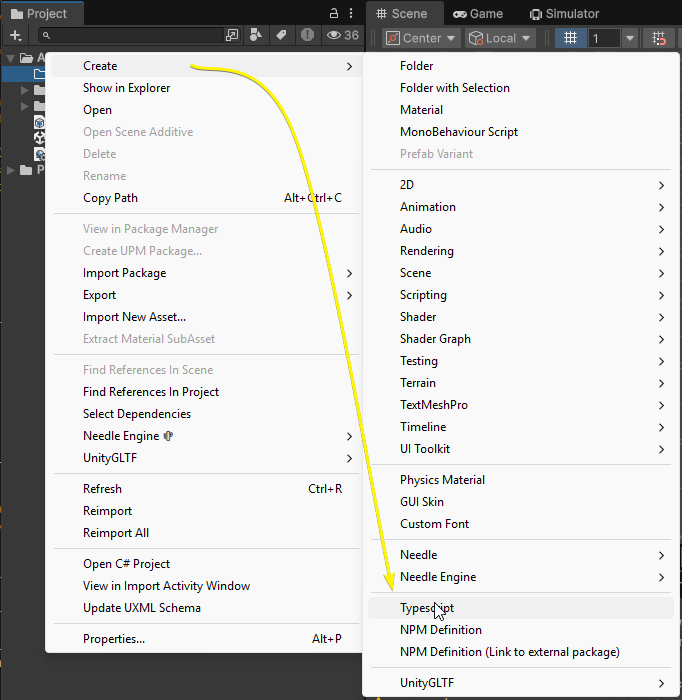
You can either create a new Typescript file in your web project’s scripts directory directly (Unity or Blender watch this directory for changes and create the matching C# file / Blender panel) or in Unity the context menu “Create/Typescript” does the same but from Unity (you must have the Needle Engine component in your scene)
Thanks. Using the context menu and then Create–Typescript is what I did. I tested it just now and again the file immediately disappears from the Unity Editor.
After searching the project in Windows Explorer I found that it is in
/Library/Needle/Sample/src/scripts
So now the question is, how can I access that folder from the Unity editor to open and edit the script? It’s not in Assets.
Edit: found a way. Once the component is added to a GameObject I can doubleclick on it to get to the editable script.
Yes or via the Needle Engine component, which is your main component for setting up your web project (there’s both a Open Workspace and Open Directory button to access your web project)