Hi,
NE: 6.0.0 - alpha 6
Unity: 2022.3.55f1
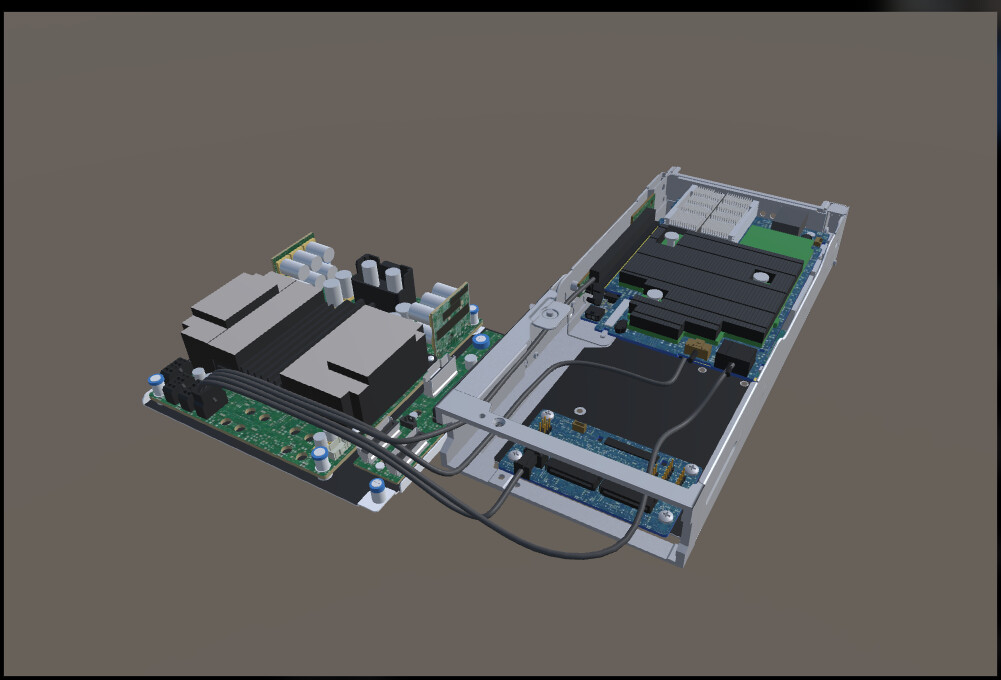
The first image shows the original/uncompressed GLB, where all objects and meshes are present and correctly positioned.
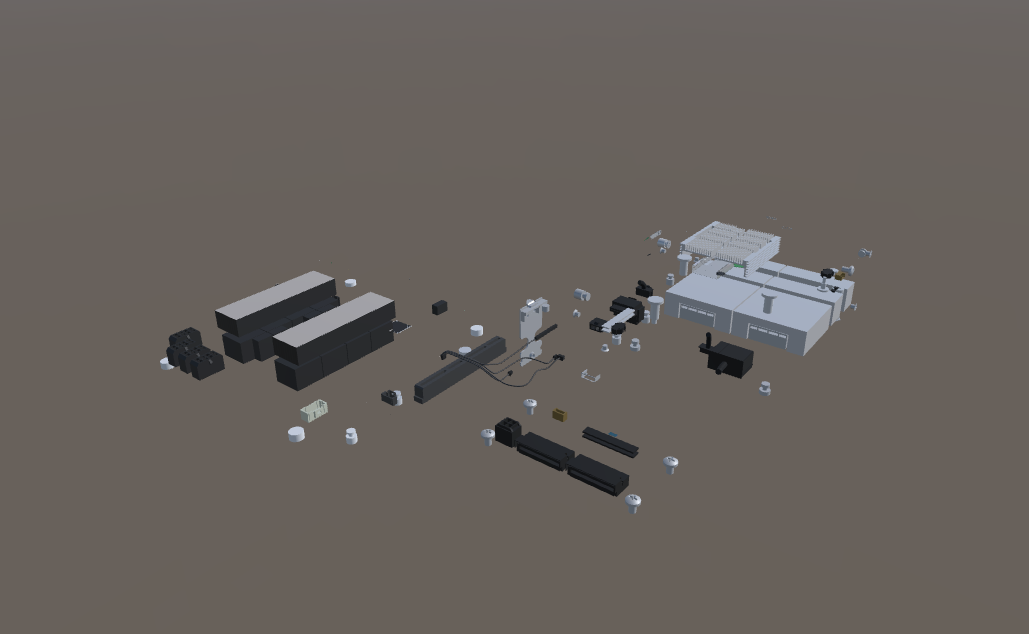
The second image shows the compressed GLB, where multiple objects, meshes, and smaller components are missing after compression. The missing geometry is not limited to a specific part of the model; several components across the scene are affected.
Sent u a bug report as well.
Thanks.
Thanks Ashok — since you’re on an alpha, this could be a bug, but there are two well-known compression causes worth checking first:
- Draco vs. blend shapes: Production builds compress meshes with Draco by default, which does not support morph targets/blend shapes and can drop that geometry. If your missing meshes are skinned or have blend shapes, switch to Meshopt via the Compression & LOD Settings component (or per
GltfObject/prefab).
- Automatic LOD simplification: Builds generate up to 6 LOD levels via progressive simplification — small components can be simplified away. Check the same component’s LOD/simplification settings, and preview with
?wireframe appended to your URL to see what survived.
Next step: rebuild with Meshopt + LODs disabled for a test, and confirm whether the geometry is missing in the compressed GLB itself (open it in a GLB viewer) vs. only at runtime. If geometry is present in the file but invisible in the browser, that points to a progressive-loading issue (e.g. LOD files not deployed).
Docs: Mesh Compression · Progressive Loading & LODs
Do the missing meshes have blend shapes or skinned animation? That would confirm the Draco hypothesis.
For project-specific help, ask Needle Cloud AI.
Hi, do you have more information about this project? Did this issue appear after an update? And is it possible that it’s related to Build fails on 6.0.0 - alpha 6 - #3 by Marcel_Wiessler1 ?
Hi send u a bug report with the scene.
Hey,
we are missing some Models in your report (cables mainly). But also with the other models in the Unity scene I can’t get it to reproduce.
Can you please try to clear the compression cache and export it again?
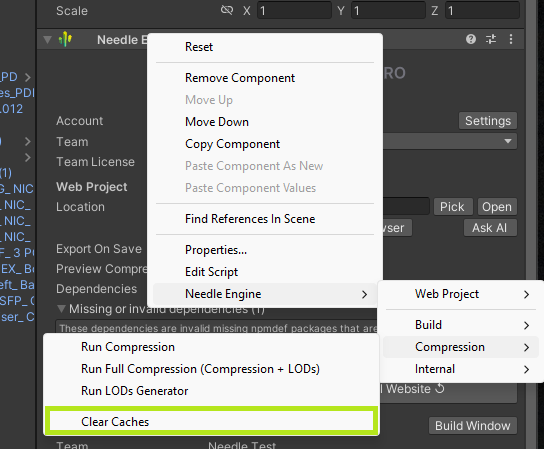
Just open the scene and select the Needle Engine exporter component, right click on the component header to open the context menu and select Needle Engine > Compresion > Clear Cache.
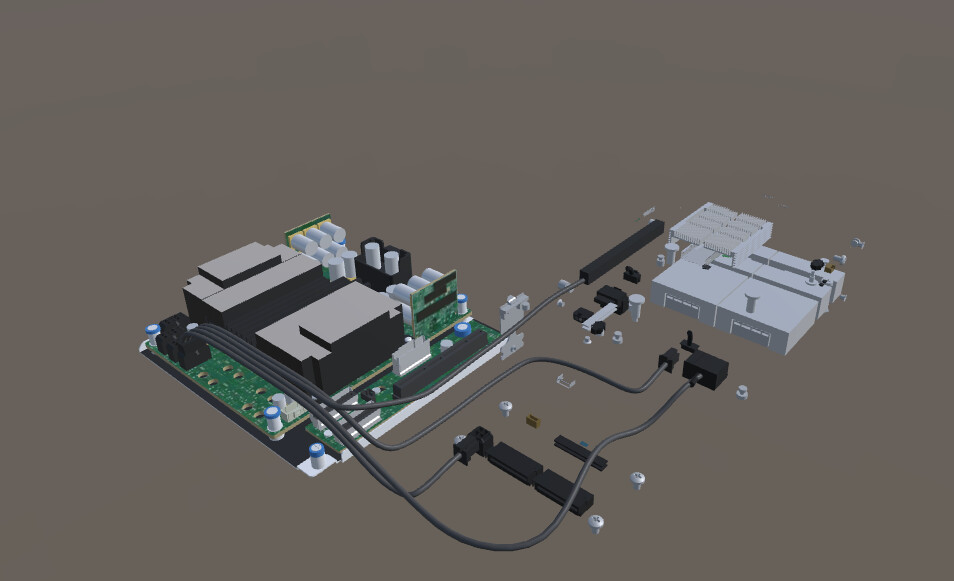
Cleared caches and did a clean export as well. This is the result
I found out why the cable files are missing from the report. The log files show an error saying the path is too long:
…\BugReport Unity Dell_Bundle_2025_Set01_Server_NeedleUpdate\Assets\PowerEdge\PE XE9712\Cabling\XE9712_ Cable Route and Plug Animation\Cable FBX\XE9712 Cables_PDB port 04 to Left Bay/XE9712 Cables_PDB port 04 to Left Bay.fbx.meta
I’m not yet sure whether this causes problems in other places too. C# and Windows have default limits on path length (260 characters), and I’m looking into it further. Another option would be to shorten long file and folder names and try the export again.
Sorry for the inconvenience.
But if you try without compression the same scene exported as glb without any issues. If this a path length limitation issue then uncompressed too miss those meshes right?
Hi, one suspect is that the compression pipeline does by chance hit the path length limitation for some meshes - we’re investigating this as well. But that would explain why it works without compression and some meshes fail to compress currently because of long pathes on windows.
could you please send us your project as a Zip file? so we have the complete project to analyse? Thank you!
hey @Ashokkumar_KR ,
How’s going? Has filename changing already solved your issue?
When not, we would be happy when you can share your project as zip file for us (don’t need to be shared here).
I have yet to check it. Will surely update if its resolved the issue or not. Thanks
I’m on the latest 6.0.Alpha 7, and it looks like the issue is still there. It occurs especially when the scene has a lot of lights (Point lights). If I delete those lights, compression works fine, and I get what I expect in the browser.
Hello Ashok,
Would it be possible to give us access to your project directly or send us a full copy? The bugreport did not contain all the files to reproduce the issue unfortunately. Feel free to DM.