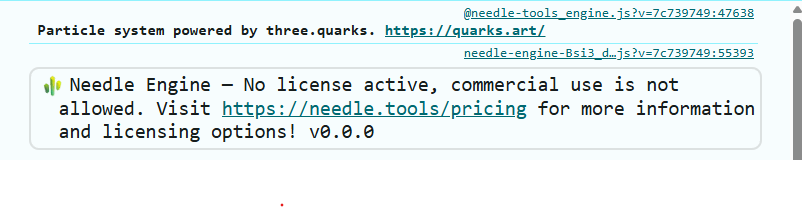
Hi,
I’m using Needle Engine 6.0.0-alpha in a standalone web project, and I have a Pro license.
As explained in the documentation (" Questions and Answers (FAQ) 💡 | docs "), I ran the following commands:
npx needle-cloud login

✔ MCP server available at http://localhost:8424/mcp
✔ Server started on http://localhost:8424 (v2.4.2, built 2026-07-11 00:59)
✔ Successfully logged in as XXX

PS C:\Users\XXX\Desktop> npx --yes needle-cloud start-server

✔ MCP server available at http://localhost:8424/mcp
✔ Server started on http://localhost:8424 (v2.4.2, built 2026-07-11 00:59)
However, the browser window never opened automatically. It appears to authenticate successfully, but I’m never shown the option to select the team that has the Pro license.
Even if I manually open http://localhost:8424 in the browser, I only see the message: “Successfully logged in. You can close this window.”
When I run my project locally, I still get the “License not found” message in the console.
Any solutions?
Hey Ashok, the issue is likely that your login didn’t let you select the right team. Run npx needle-cloud me to check which team you’re logged into.
If it’s not the Pro team, log out with npx needle-cloud logout, then log in again. The browser should open – if it doesn’t, set the BROWSER env variable or use a token instead (see docs).
Also make sure the license server (npx needle-cloud start-server) is running before you run npm run build – not after.
If that still fails, paste the output of npx needle-cloud me here.
Sources: Needle Engine Docs (80%), Needle Engine Docs (78%), Needle Engine Docs (59%)
4 replies left
Reply to this post directly if you need further help (bottom right button)
npx needle-cloud me
 You are logged in as XXX
Hi @Ashokkumar_KR
Thanks for the detailed write-up — that helps a lot.
What’s happening:
your account is a member of more than one team, and the PRO license lives on one specific team. In the standalone (vite/React) flow the license server needs to know *which* team to use.
Normally you’d pick it in the browser during needle-cloud login, but that selection step isn’t showing up for you — so the server falls back to a team without PRO and you get “License not found”. We’re looking into why the login isn’t prompting to improve this.
The fix
You can set the id of the team (you can get it from your team page on Needle Cloud) in your build config. In your vite.config.js, where you already add the Needle plugin, pass your team in the settings argument (the third parameter):
needlePlugins(command, needleConfig, {
    license: { team: "your-team-id" }
}),
Since you’re already logged in (needle-cloud login), that’s all you need — the build/dev process starts the license server for you automatically and reuses your login session, so you don’t have to keep start-server running manually.
You’ll find your team ID in your team’s edit dialogue: https://cloud.needle.tools/team.
Alternatively
To avoid the login/team step entirely: create an access token on that PRO team’s page and set it as NEEDLE_CLOUD_TOKEN before your build — the token is tied to the team, so the PRO license is found automatically. This is also the recommended approach for CI/CD.
(If you’re on Next.js instead of vite, it’s the same `license: { team }` option in the Needle Next config.)
I hope that helps. Let me know if that fixes the issue for you.
It fixed the issue. Hope u guys update this in the docs as well. Thanks a lot
Hi, adding needle plugins in vite config cause build failure. I guess it happens in vite 8+. Before adding suggested fix(needle plugins in vite config) there is no issue in build being succeded. Now even though it retrived the license build failure occurs.
Rolldown panicked. This is a bug in Rolldown, not your code.

thread ‘rolldown-worker’ (29892) panicked at crates\rolldown\src\stages\generate_stage\compute_cross_chunk_links.rs:584:13:
Symbol “common_functions” in “D:/Web_Projects/webgl-dynamic-latest/node_modules/three-mesh-bvh/src/webgl/glsl/common_functions.glsl.js” should belong to a chunk
note: run with RUST_BACKTRACE=1 environment variable to display a backtrace

Please report this issue at: https://github.com/rolldown/rolldown/issues/new?template=panic_report.yml

[needle-buildpipeline]
Waiting for output directory to be created… (D:\Web_Projects\webgl-dynamic-latest\dist/assets)
✗ Build failed in 4.06s

[needle-copy-files]
No assets directory found. Skipping copy of assets resolved to assets
Include: include → dist/include
Copied files: 1, 14.88 kB
✨ Happy creating! 🌵
[needle-buildpipeline]
Aborting after 60.437 seconds… Your website bundling process did take longer than expected. Try increasing the timeout via the buildPipeline.timeoutDuration setting in your vite.config.js (default is 60 seconds).
[needle-buildpipeline]
Output directory not found/created at “D:\Web_Projects\webgl-dynamic-latest\dist/assets” - aborting…
[needle-buildpipeline]

Build pipeline task did not succeed.
error during build:
Error: [needle-buildpipeline] - Build pipeline failed. Please check the logs above for more information.
at file:///D:/Web_Projects/webgl-dynamic-latest/node_modules/@needle-tools/engine/plugins/vite/build-pipeline.js:233:35
at
at async plugin (file:///D:/Web_Projects/webgl-dynamic-latest/node_modules/rolldown/dist/shared/bindingify-input-options-XPJLJOD0.mjs:1737:4)
at async plugin. (file:///D:/Web_Projects/webgl-dynamic-latest/node_modules/rolldown/dist/shared/bindingify-input-options-XPJLJOD0.mjs:1959:12) {
code: ‘PLUGIN_ERROR’,
plugin: ‘needle:buildpipeline’,
hook: ‘closeBundle’
}
Yes it’s been updated already at the same time, thank you 
Hi, which Needle Engine version and Vite version exactly are you using? We added Vite 8 support with Needle Engine 5, so this should work. Older Needle Engine versions might need an update if you want to use Vite 8
"@needle-tools/engine": "6.0.0-alpha",

 "three": "npm:@needle-tools/three@0.185.2-alpha.1",

"vite": "^8.1.1",
I guess it’s not an issue in the needle version. The issue lies in the plugin. Even now, if I remove the plugin from the Vite config file, the build succeeds as expected.
import { defineConfig } from "vite";
import react from "@vitejs/plugin-react";
import basicSsl from "@vitejs/plugin-basic-ssl";

// https://vite.dev/config/
export default defineConfig(async (command) => {
  const { needlePlugins, loadConfig } =
    await import("@needle-tools/engine/plugins/vite/index.js");
  const needleConfig = await loadConfig();
  return {
    base: "./",
    plugins: [
      basicSsl(),
      react(),
      needlePlugins(command, needleConfig, {
        license: {
          team: "xxxx",
        },
      }),
    ],
    server: {
      https: true,
      proxy: {
        // workaround: specifying a proxy skips HTTP2 which is currently problematic in Vite since it causes session memory timeouts.
        "https://localhost:3000": "https://localhost:3000",
      },
      strictPort: true,
      port: 3000,
    },
    build: {
      outDir: "./dist",
      emptyOutDir: true,
    },
  };
});
Can you share the exact Vite version (you can see it in node_modules/vite or in your package.lock.json). "^8.1.1", is still not clear unfortunately.
Rolldown panicked. This is a bug in Rolldown, not your code.

thread ‘rolldown-worker’ (29892) panicked at crates\rolldown\src\stages\generate_stage\compute_cross_chunk_links.rs:584:13:
Symbol “common_functions” in “D:/Web_Projects/webgl-dynamic-latest/node_modules/three-mesh-bvh/src/webgl/glsl/common_functions.glsl.js” should belong to a chunk
note: run with RUST_BACKTRACE=1 environment variable to display a backtrace

Please report this issue at: https://github.com/rolldown/rolldown/issues/new?template=panic_report.yml
Seems like a rolldown issue with three-mesh-bvh - I’ll try if it reproduces here as well.
Edit:
It does reproduce with Vite 8.1.5 but works fine with Vite 8.0.1. Could you try downgrading Vite for now? I’ll look at the issue in the meantime and try to prodive a fix later today for Vite 8.1 but need to investigate first.
“node_modules/vite”: {
  "version": "8.1.5",

  "resolved": "https://registry.npmjs.org/vite/-/vite-8.1.5.tgz",

  "integrity": "sha512-7ULLwsCdYx/nRyrpiEwvqb5TFHrMVZyBt+rg/OAXT7rgj/z+DtTDyKFeLAdDkubDVDKD8jOsndmy7m55XcfUsw==",

  "dev": true,

  "license": "MIT",

  "dependencies": {

    "lightningcss": "^1.32.0",

    "picomatch": "^4.0.5",

    "postcss": "^8.5.17",

    "rolldown": "\~1.1.5",

    "tinyglobby": "^0.2.17"

  },

  "bin": {

    "vite": "bin/vite.js"

  },

  "engines": {

    "node": "^20.19.0 || >=22.12.0"

  },

  "funding": {

    "url": " https://github.com/vitejs/vite?sponsor=1 "

  },

  "optionalDependencies": {

    "fsevents": "\~2.3.3"

  },

  "peerDependencies": {

    "@types/node": "^20.19.0 || >=22.12.0",

    "@vitejs/devtools": "^0.3.0",

    "esbuild": "^0.27.0 || ^0.28.0",

    "jiti": ">=1.21.0",

    "less": "^4.0.0",

    "sass": "^1.70.0",

    "sass-embedded": "^1.70.0",

    "stylus": ">=0.54.8",

    "sugarss": "^5.0.0",

    "terser": "^5.16.0",

    "tsx": "^4.8.1",

    "yaml": "^2.4.2"

  },

  "peerDependenciesMeta": {

    "@types/node": {

      "optional": true

    },

    "@vitejs/devtools": {

      "optional": true

    },

    "esbuild": {

      "optional": true

    },

    "jiti": {

      "optional": true

    },

    "less": {

      "optional": true

    },

    "sass": {

      "optional": true

    },

    "sass-embedded": {

      "optional": true

    },

    "stylus": {

      "optional": true

    },

    "sugarss": {

      "optional": true

    },

    "terser": {

      "optional": true

    },

    "tsx": {

      "optional": true

    },

    "yaml": {

      "optional": true

    }

  }

},
Yeah this will do. Thanks a lot
You’re welcome!
It seems to be caused by a regression in Vite’s rolldown and a bugreport has been submitted to them Issue · GitHub