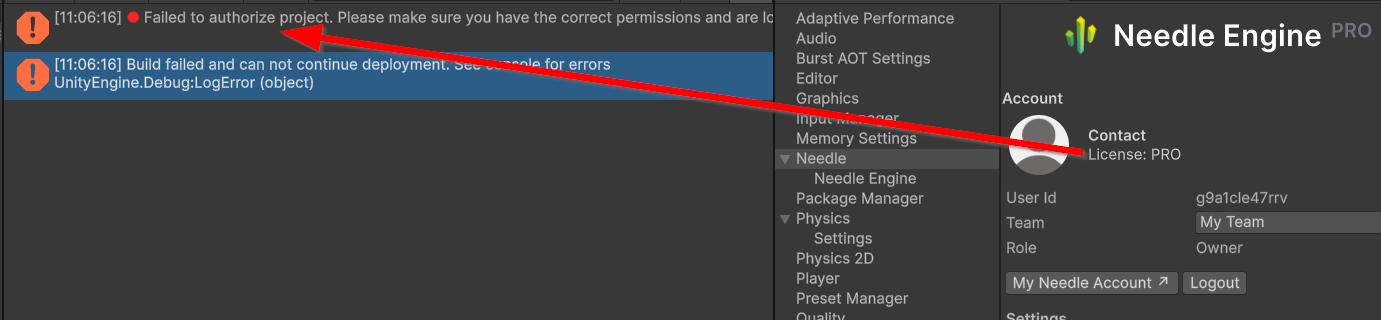
The most common cause of “license not found” on export is the license server not picking up your license — usually a team or login issue. Here’s what to check:
-
Verify you’re logged in to the right team. Run
npx needle-cloud meto confirm your account and team. If you have multiple teams, make sure you’re in the team that owns the PRO license:npx needle-cloud loginThen select the correct team. The FAQ documents this exact failure: My build uses a BASIC license even though I have PRO.
-
Make sure the license server is running. In the interactive Unity editor it starts automatically, but if you’re exporting from the command line / batch mode you must start it explicitly:
npx --yes needle-cloud@version-2 start-server -
In the Unity editor, confirm the account/team is set under
Project Settings > Needle.
Could you share the full error message from the export (from the Unity Console), and whether this is running in the interactive editor or via command line/CI? That will narrow it down. If you’d like me to look at project logs, you can continue in Needle Cloud AI.
For project-specific help, ask Needle Cloud AI.
Hello Matthias, can you check if the selected team in the Settings (My Team) is the right one with the license? Could you please send a bugreport using the menu Needle Engine/Report a bug otherwise so we can check your logs?
Thank you and sorry for the inconvenience.
Hello Marcel
there are two teams, and only “My Team” has the Pro license.
Hello Matthias, could you send a bugreport? Then we can check if there is more information + get all the details about the versions currently installed and running.
After sending: Please see if http://localhost:8424/api/logs shows any information and if restarting Unity fixes the issue. A bugreport would be helpful either way!
Also note that Needle Cloud AI has optionally access to read local log and project files if you start a Chat there (with Unity open/needle-cloud CLI running and the CLI access toggle enabled in the Chat).