Needle Engine 5.1.9, Unity 6000.4.2f1, macOS. Node at /usr/local/bin/node (not nvm-managed, standard install).
I have a custom script (VoiceAssistant.ts) in src/scripts/, correctly registered in register_types.ts. Component Generator is present in the scene and shows “Script watcher is active”.
No VoiceAssistant.cs is ever generated in Assets/Needle/Components.codegen/, and the component never appears in Add Component. No errors in Unity Console. No component-compiler.log file exists anywhere in the project (searched the whole project folder) — it seems the compiler process is never even invoked for this file, not just failing silently.
Already tried: full restart of Unity and the Vite dev server, deleting node_modules + dist + fresh npm install, deleting Unity’s Library folder and letting it reimport, “Refresh Local Website” button, manually deleting the (previously broken due to unrelated TS syntax issues) generated .cs to force regeneration.
Other components created earlier in this same project generated correctly with this exact workflow, so it doesn’t seem to be a fundamental setup issue.
Hey Dragos — this exact symptom (no stub, no log, no errors) usually means the component isn’t being registered. Most common cause: missing @registerType decorator on the class.
Check that VoiceAssistant.ts has:
@registerType
export class VoiceAssistant extends Behaviour { ... }
Without it, the compiler skips the file entirely.
Also double-check that the class name in TypeScript matches the filename exactly (case-sensitive) and that the file is actually imported in main.ts or register_types.ts — a re-export from another file isn’t enough if it’s tree-shaken.
If that’s all good, try adding a temporary console.log at the top of VoiceAssistant.ts to see if the file even gets loaded. That tells you whether the import chain works.
Could you try with Unity open (as usual in Needle Engine scene) to open your VoiceAssistant.ts file and add a space and save it (to set it dirty). It sounds like the FileWatcher did not pick up the file.
Does the VoiceAssistant derive from a Behaviour class? Would you mind sharing the script here if above doesn’t work?
Hello,
Thanks for the suggestions. Here’s what I found after testing:
I tried keeping Unity’s window focused (in the foreground) right before and immediately after saving VoiceAssistant.ts in VS Code, in case the FileWatcher only reacts when Unity has focus and no change. Also confirmed I’m not in Play Mode, and tried a manual Assets → Refresh from the menu (not just right-click) and no change either.
Result after all of that: still nothing in the Vite terminal, nothing new in Unity’s Console, no VoiceAssistant.cs ever appears in Assets/Needle/Components.codegen/, and “VoiceAssistant” still doesn’t show up in Add Component search.
Yes, it does derive from Behaviour (imported from @needle-tools/engine). Here’s the full script -
I replaced the real API URL with a placeholder, otherwise it’s exactly what I have:
import { Behaviour, Animator, serializable } from "@needle-tools/engine";

export class VoiceAssistant extends Behaviour {

  // Drag the character's Animator component here, in Unity
  @serializable(Animator)
  animator?: Animator;

  // Name of the greeting animation state - plays once at the start
  @serializable()
  greetStateName: string = "Standing Greeting";

  // "Thinking" animation, played while waiting for the API response
  @serializable()
  thinkingStateName: string = "Thoughtful Head Shake";

  // Names of the "talking" states, one per response category
  @serializable()
  talkingTechnicalStateName: string = "Talking";

  // Temporary, until a dedicated "excited" animation exists - reuses Talking
  @serializable()
  talkingPersonalStateName: string = "Talking";

  @serializable()
  talkingProjectStateName: string = "Pointing";

  @serializable()
  talkingNeutralStateName: string = "Talking";

  // Idle state name - returns here after finishing speaking
  @serializable()
  idleStateName: string = "Breathing Idle";

  // URL of the serverless function (Vercel) that talks to the LLM
  @serializable()
  apiUrl: string = "https://YOUR-PROJECT-NAME.vercel.app/api/ask";

  @serializable()
  lang: string = "fr-FR";

  // Welcome message, spoken once on load - freely editable here
  @serializable()
  greetingMessage: string = "Bonjour ! Je suis la version virtuelle de Dragos-Alexandru Lup. Je repondrai avec plaisir a toutes tes questions. Quel est ton prenom, et que voudrais-tu savoir ?";

  private recognition?: any;
  private listening: boolean = false;
  private speaking: boolean = false;
  private visitorName: string = "";

  start() {
    const Recognition = (window as any).SpeechRecognition || (window as any).webkitSpeechRecognition;
    if (!Recognition) {
      console.warn("This browser does not support speech recognition.");
      return;
    }
    this.recognition = new Recognition();
    this.recognition.lang = this.lang;
    this.recognition.continuous = false; // captures one question at a time, we restart it ourselves below

    this.recognition.onresult = (event: any) => {
      const question = event.results[0][0].transcript;
      this.askQuestion(question);
    };

    this.recognition.onerror = () => {
      this.listening = false;
      // retry listening, only if the avatar isn't currently speaking
      if (!this.speaking) this.startListening();
    };

    this.recognition.onend = () => {
      this.listening = false;
      if (!this.speaking) this.startListening();
    };

    // Greet once, when the scene loads - animation + spoken message
    this.speaking = true;
    const controller = (this.animator as any)?.controller;
    controller?.play?.(this.greetStateName);

    const greeting = new SpeechSynthesisUtterance(this.greetingMessage);
    greeting.lang = this.lang;

    greeting.onend = () => {
      controller?.play?.(this.idleStateName);
      this.speaking = false;
      this.startListening();
    };
    greeting.onerror = () => {
      this.speaking = false;
      this.startListening();
    };

    speechSynthesis.speak(greeting);
  }

  private startListening() {
    if (this.listening || this.speaking || !this.recognition) return;
    this.listening = true;
    try {
      this.recognition.start();
    } catch (e) {
      // might already be started for some reason - ignore the error
      this.listening = false;
    }
  }

  private async askQuestion(question: string) {
    // Pause listening while we process and speak, so it doesn't hear itself
    this.speaking = true;

    const controller = (this.animator as any)?.controller;
    // Show a "thinking" animation while waiting for the Gemini response
    controller?.play?.(this.thinkingStateName);

    try {
      const res = await fetch(this.apiUrl, {
        method: "POST",
        headers: { "Content-Type": "application/json" },
        body: JSON.stringify({ question, visitorName: this.visitorName })
      });
      const data = await res.json();

      if (data.visitor_name) {
        this.visitorName = data.visitor_name;
      }

      const stateByCategory = {
        projet: this.talkingProjectStateName,
        technique: this.talkingTechnicalStateName,
        personnel: this.talkingPersonalStateName,
        neutre: this.talkingNeutralStateName
      };
      const stateToPlay = (stateByCategory as any)[data.animation] || this.talkingNeutralStateName;
      controller?.play?.(stateToPlay);

      const utterance = new SpeechSynthesisUtterance(data.spoken_text);
      utterance.lang = this.lang;

      // Only after it finishes speaking, return to idle and reopen the mic
      utterance.onend = () => {
        controller?.play?.(this.idleStateName);
        this.speaking = false;
        this.startListening();
      };
      utterance.onerror = () => {
        controller?.play?.(this.idleStateName);
        this.speaking = false;
        this.startListening();
      };

      speechSynthesis.speak(utterance);

      if (data.project_id) {
        console.log("Project to show:", data.project_id);
      }
    } catch (err) {
      console.error("Error asking question:", err);
      this.speaking = false;
      this.startListening();
    }
  }
}
Thanks, but I checked the official decorators reference page (the one listing all available Needle Engine decorators: @serializable, @syncField, @validate, @prefix) and @registerType doesn’t appear there — it doesn’t seem to be a real decorator in the current API. I don’t think that’s the issue here.
I also checked experimentalDecorators in tsconfig.json as a related possibility — it’s already set to true.
To recap the actual symptoms, since none of the suggestions so far have changed anything: the class extends Behaviour, is correctly registered in register_types.ts (verified by reading the file directly), the class name matches the filename exactly, and Component Generator shows “Script watcher is active” in the scene. Still, no VoiceAssistant.cs is ever generated, no errors appear anywhere (Unity Console, Vite terminal, or any component-compiler.log file — none exists anywhere in the project), and the component never appears in Add Component search. I’ve also tried: full restarts of both Unity and the dev server, deleting node_modules/dist and reinstalling, deleting Unity’s Library folder, keeping Unity focused during save, and manual Assets → Refresh.
The @registerType decorator isn’t in the docs because it doesn’t exist for you to import — it’s an internal compiler hint, not something you add manually. That’s not the issue.
The real clue: no component-compiler.log anywhere. The compiler process isn’t even starting for your file. This usually means the file watcher doesn’t see a change it cares about.
Force it: in Unity, right-click your VoiceAssistant.ts in the Project window and select Reimport. If that doesn’t trigger generation, check that the file is in a folder Vite watches — files in src/ subdirectories are fine, but the file needs to be actually imported in main.ts (not just register_types.ts) for Vite to include it in the bundle. Try adding import "./scripts/VoiceAssistant"; directly in main.ts, save, then reimport in Unity.
Thank you !! Found it. Running the compiler manually confirmed the script itself was always fine (all fields parsed correctly). The issue was specifically in Unity’s automatic invocation of the compiler, not the script or project config.
Workaround that worked: ran the compiler directly from the command line
which generated the .cs file successfully. After a manual Refresh in Unity, the component now shows up correctly in Add Component with all fields intact.
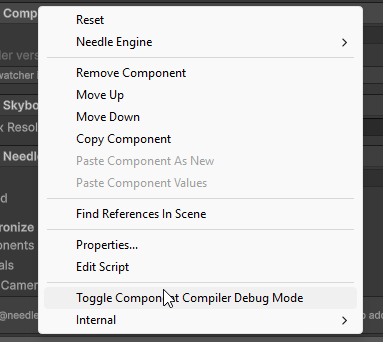
Thanks for the debug mode tip - that’s what finally surfaced the “Compilation failed” message that pointed me toward testing the compiler manually. Still not sure why Unity’s automatic invocation fails silently while the manual run works fine, but at least I have a reliable workaround now.
Hi, that’s really odd, would you be able to send the log files of the failed compiler invocation? Maybe it has something to do with some characters in your project path?