Hi, after repeatedly logging out and logging in again (and getting the message, that my login to the PRO account was successfull, I can not open my project. Each time I try to refresh or do a full export/ the error message suggest me to check permissons.
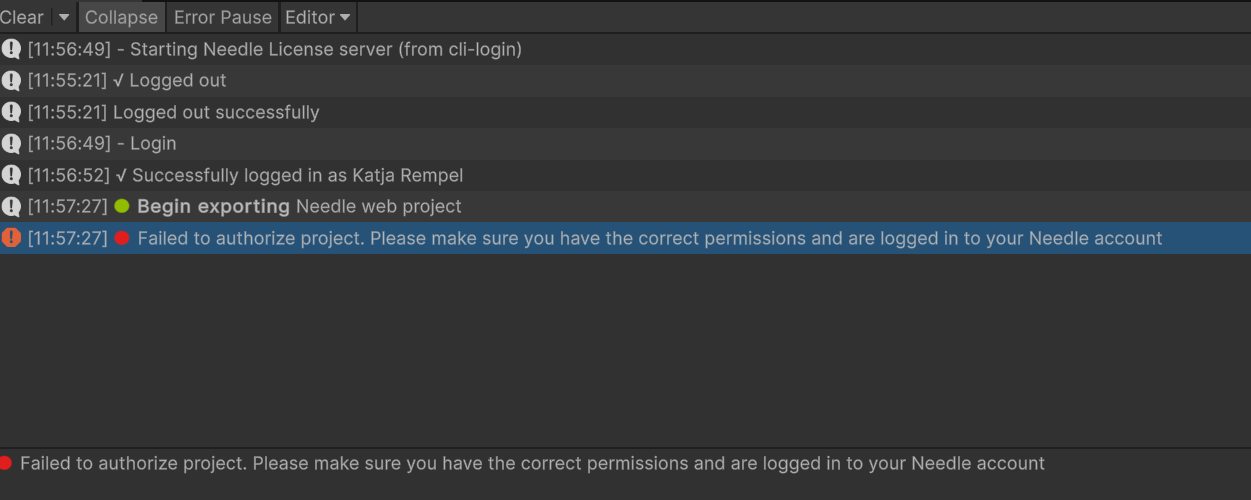
Hey Katja — the screenshot shows a permissions error which usually means the license server can’t find your PRO license. Most common cause on multi-team accounts: even though you logged in successfully, the license server may be checking the wrong team.
Run this in your terminal to confirm:
npx needle-cloud me
If it shows a team that doesn’t have PRO, sign in to the correct one:
npx needle-cloud login
Make sure you select the team that actually owns the PRO license during the browser flow. If you’re in CI or a standalone build (not Unity/Blender), you also need to start the license server before building:
npx --yes needle-cloud start-server
If you’re in Unity, restart it after logging in, and check that the license server started automatically (look in the console).
Sources: Needle Engine Docs (59%), Needle Engine Docs (53%)
4 replies left
Reply to this post directly if you need further help (bottom right button)
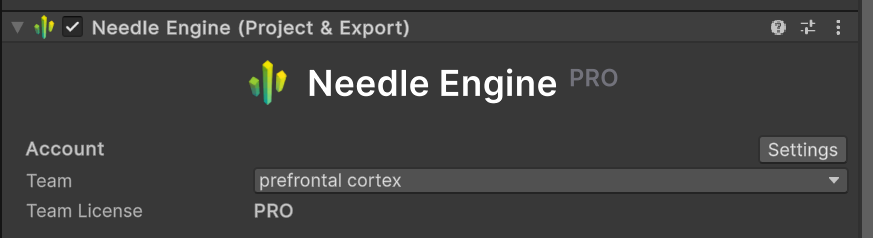
Katja — that error usually means the license server can’t find your PRO license, even though the login itself succeeded. The most common culprit is being logged in with the right account but the wrong team — if you belong to multiple teams, the license server might be checking a team that only has BASIC.
First, check which team is currently active:
npx needle-cloud me
If it doesn’t show the team with your PRO license, log in again and explicitly select that team:
npx needle-cloud login
In the browser window, make sure to pick the team that actually owns the PRO license. If you’re working in standalone (outside Unity/Blender), you also need the license server running before you build:
npx --yes needle-cloud start-server
If you don’t have a PRO license but think you should, try logging out and back in one more time in the browser, then check on your Needle Cloud team page that the PRO subscription shows up on the right team.
If it’s still failing after confirming the team, share the error log or a screenshot of what npx needle-cloud me prints — that’ll tell us exactly which team the license server sees.
Sources: Needle Engine Docs (59%), Needle Engine Docs (55%), Needle Engine Docs (53%), Needle Engine Docs (53%)
3 replies left
Reply to this post directly if you need further help (bottom right button)
Hi, no the Unity UI is using the license server, there’s no other system running (the error you got above was also given by that same process and just displayed in Unity).
Does it work now with the right team selected?
Unfortunately not. The strange thing is - the team was shown/selected correctly from the start.
@Marcel_Wiessler1 Additional info: this happens only in 1 particular project. I can work in my other 2 current needle projects without getting this issue.
this is a slighly older project - from june. so the needle version is not the newest ( and I no not really want to update the version now, since it is just a typo I want to fix. when I uptate to the newer version, I will have to test the whole project and eventually fix new bugs^^ )

Ok,
After:
- 3 x restarting Unity
- 4 x logouts and logins
- deleting npm cache
- install dependencies
I can open the project again 
Hi Katja,
Thanks, i think what happened is: You started Unity with a new Needle Engine version (or newer) which automatically started the license server.
Then the old project could not talk to the license server running (between 4.10 and 5 we added some critical security hardening, hence Unity could not validate your license because it was not sending the right information).
If you ever have to switch between older and newer projects and run into this again close Unity, find the Needle license server process in your task manager and quit it/kill it - start Unity with your other project (old or new).
Hi Marcel! Thank you for the clarification. Yes, I can confirm, I was working on another newer needle-project before opening the older one.