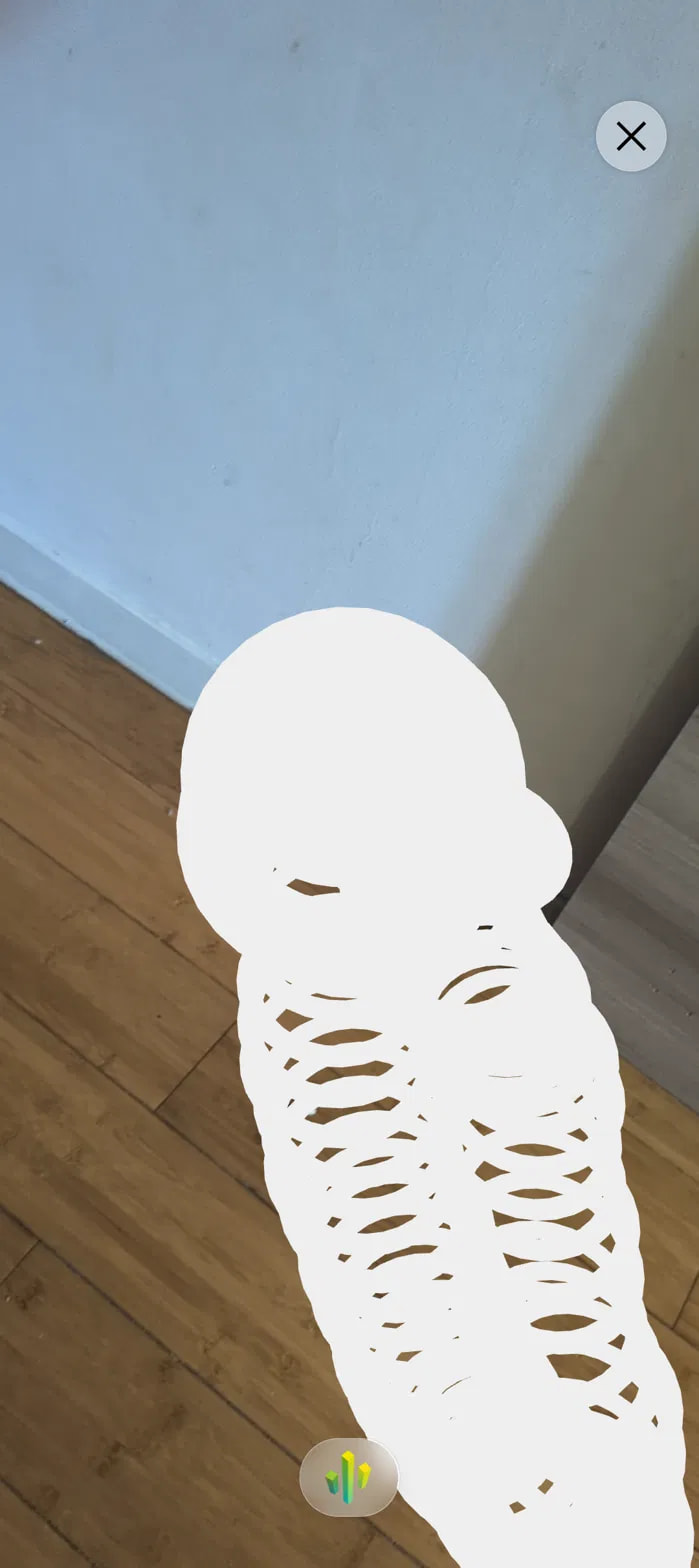
Since early Saturday Aug 22, AR sessions on Android show heavy smearing:
the WebGL layer is never cleared between frames, so everything drawn
accumulates on screen. The camera passthrough itself renders correctly —
only the rendered 3D layer piles up. The AR reticle leaves a trail of
overlapping rings as I move the phone (see screenshots).
Both are old builds. I have not touched either project since deploying
them. The mushroom one worked fine until Saturday and then started
failing on its own.
Environment
Needle Engine 5.1.4 (both builds report this in the console)
Unity 6000.3.7f1, Universal 3D (URP) template
Android phone (bought one week ago), Chrome
iPhone via App Clip: the SAME broken build works correctly
Also reproduces with a brand-new empty scene containing only a cube,
built from a fresh project with the same template. So it is not related
to scene content or complexity.
What I have ruled out
Not the scene or the 3D content — iOS App Clip renders it correctly
Not the Needle version — both builds report 5.1.4
Not scene complexity — a single-cube scene reproduces it
Not the browser or device alone — another old build still works on the
same phone and browser
Given that a previously working deployment broke without being rebuilt,
I suspect something changed on the device side (ARCore / Google Play
Services for AR auto-update around Aug 22), but I cannot explain why one
build is affected and another is not.
The smearing (WebGL layer not cleared) strongly points to a change in ARCore or Chrome’s WebXR compositor that now expects the app to explicitly clear the color buffer each frame.
Try this first:
In your Unity scene, open the WebXR component and make sure Transparent Background is unchecked. Also set the Camera’s Clear Flags to Solid Color (not Don’t Clear).
One question: Can you share a screenshot comparing the WebXR component settings between the working (halloween-ar-01) and broken (mushroom-house) builds? Same Needle version, so the difference is likely a toggle you missed in the new scene.
If that’s not it, test by deploying the broken scene to a new URL and try disabling alpha in the WebXR session options – but the component toggle is the fastest fix.
0 replies left - Become PRO for more replies. Reply to this post directly if you need further help (bottom right button)
I created a brand new Unity project from the default Universal 3D template, added a single cube and the WebXR component, and built it. Nothing else was changed. Needle Engine 5.1.12 (latest).
Same problem: the WebGL layer is never cleared between frames, so everything drawn accumulates. The camera passthrough itself renders correctly.
I didn’t compare the two builds’ WebXR settings in the end — a brand new project with default settings reproduces it, so a missed toggle can’t be the cause. There is also no “Transparent Background” option in the WebXR component.
Environment:
- Unity 6000.3.7f1, Universal 3D (URP) template, default settings
The smearing (WebGL layer not cleared) on Android Chrome is a known issue caused by a change in Chrome’s WebXR implementation that now expects explicit autoClear behavior. Since a brand-new project reproduces it, this rules out a scene-specific toggle.
If that doesn’t help, set the camera’s clear color to #000000 with alpha 1 in the Unity camera settings, and ensure the WebXR component’s background color is opaque (not transparent).
Both fixes force the color buffer to clear each frame on Android Chrome. iPhone works because Safari handles this differently.
If the issue persists, share your deployed URL or file a bugreport (Unity: Needle Engine > Report a Bug) so we can inspect the compiled WebXR session config.
Solved: delete the Global Volume object from your scene.
Unity’s URP template includes one by default, so every new project has it. Remove it, rebuild, and the trails are gone.
Note: unchecking “Post Processing” on the Main Camera does not work — the Volume object itself has to go.
Android Chrome only; iOS App Clip was never affected. Happens on Needle 5.1.4 through 5.1.12, so it’s not a version thing. renderer.autoClear = true (suggested above) does nothing.
Delete the Global Volume object from your Unity scene. Unity’s URP template includes one by default, and it causes this smearing issue on Android Chrome. Unchecking “Post Processing” on the Main Camera doesn’t help — the Volume object itself has to go.